Posts

Showing posts with the label network

Cisco Packet Tracer | Download

Image
C isco Packet Tracer is a powerful network simulator that can be utilized in training for CCNA  TM  and CCNP  TM certification exam by allowing students to create networks with an almost unlimited number of devices and to experience troubleshooting without having to buy real Cisco TM  routers or switches. Cisco Packet Tracer features an array of simulated Application layer protocols (HTTP, DNS, …), as well as basic routing with RIP, OSPF, and EIGRP, to the extent required by the current CCNA  TM  curriculum. (Cisco Packet tracer labs available: Click here )

DNS (Video Tutorial)

Image

UDP & TCP (Video Tutorial)

Image

What is HTTPS (Video Tutorial)

Image

Electronic mail server

Image
What is a Mail Server A mail server is the computerized equivalent of your friendly neighborhood mailman. Every email that is sent passes through a series of mail servers along its way to its intended recipient. Although it may seem like a message is sent instantly - zipping from one PC to another in the blink of an eye - the reality is that a complex series of transfers takes place. Without this series of mail servers, you would only be able to send emails to people whose email address domains matched your own - i.e., you could only send messages from one example.com account to another example.com account. Types of Mail Servers Mail servers can be broken down into two main categories: outgoing mail servers and incoming mail servers. Outgoing mail servers are known as  SMTP , or Simple Mail Transfer Protocol, servers . Incoming mail servers come in two main varieties.  POP3 , or Post Office Protocol , version 3, servers are best known for storing sent and receive...

FTP- File Transfer Protocol

Image
The  File Transfer Protocol  ( FTP ) is a standard  network protocol  used to transfer  computer files  between  a client and server  on a  computer network . TCP Control use 20 ports Commands share by TCP control between the computer. Data Connection use 21 ports File is send by the Data connections. Functions: RETR STORE LIST Response message: 331: Username is OK 125: Data Connection open 425: Can't open Connection 452: Error  Tool: Filezila is the tool which is use the FTP and file share between the computers.

Cache Server

It is a kind of server which use an static IP and entertain the client's requests. A  cache server  is a dedicated network  server  or service acting as a  server  that saves Web pages or other Internet content locally .  It is placed at the switch, all the client firstly send request to the cache server, if the cache server has that particular page, it entertains the client without going to the internet. If the cache server has not that specific page, it sends request to the that particular page's server (over the internet) to get the data. When data is received the cache server entertain the client and also store that page to its database for later use. The stored pages in the cache sever check the last modify date before give to the client, if the page is updated by the server, the cache server itself get the latest updated page and then provide for the user. It is also called proxy server or sub-sever. Why we use cache servers: It saves the ...

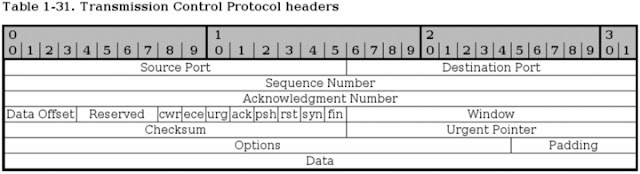
TCP header fields

Image
It consists upon approx. 9 fields. 1. Source Port 2. Destination port 3. Sequence number 4. Acknowledgement 5. Header length 6. Flag 7. Checksum 8. Urgent Pointer 9. Options Source port: It refers port number of the sender. Destination port: It refers to the port number of the receiver. Sequence number: It is used to set a number to each TCP packet so that the packet’s stream properly send or receive. It is later use in acknowledgement field to acknowledge that the perticular packet is sent. Ackowledgement: It is used to confirm that the spefic sequence numbered packet is received. Header length: It refers the length of the segment which have to transmit. Flag: These are the obe bit boolean fields used to control the trasnmission of the data accress the TCP connections. Some flags are: SYN, FIN, RESET, PUSH, URG, ACK Checksum: It is used to error free communication. It makes sure that the all the data is received on the destination withou...

UDP header fields

Image
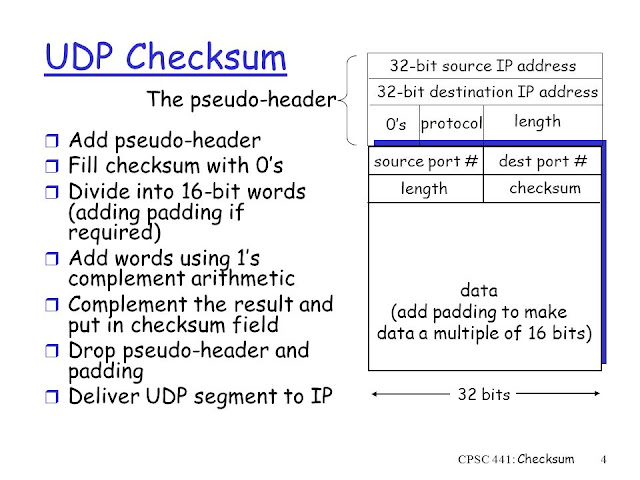
It is a 8 octet header which is consisting on four fields: 1. Destination port 2. Source port 3. Length 4. Checksum Destination port: The port number of the receiver by which the host entertain the client. Source port: The port number of the sender by which sender sends the data. Length: The length refers to the total size of the segment which is to transmit over the network. Checksum: It is used to detect the error the in the segments. The checksum also use to varify the integraty of the data. It give a delivery report to the sender about successfull sending of the data. UDP Psudo header Psudo header is considered when calculating the checksum. It is used some fields of IP header to trasnmit the error free data.

Key to Networking

Image
Key To Networking A complete and comprehensive approach to the networks OSI Models FDMA of shared medium  TDMA of shared medium Router in networking Routing table Packet Switching Circuit Switching  Core Network Fiber optics Standards of fiber optics FTTx (Fiber to the x) Guided Medium Unguided Medium Rj-45 Connector Coaxial cable Network Application Architecture Transport Layer Protocol Hyper text Vs Hyper Media Application Layer protocol Persistent Connections  Non-Persistent Connections RTT-Round Trip Time HTTP Request Message HTTP Response Message HTTP cookies Google panda working principle    Hypertext Vs hypermedia   Complete networking solution (Graduation level)   Verification Vs Validation   Microsoft Project Professional 2010 complete download with key    Cyber crime protection bill   Wardriving    50+ Java Interview questions (revised)   How google index you ...

HTTP cookie

Image
What is cookie An  HTTP cookie  is a small size text file sent from a web server and stored in the user's  web browser  while the user is browsing. Every time the user loads the website, the browser sends the cookie back to the web server to notify the user's previous activity in the whole website. What is could store Your activity on the website (all navigation) Your shopping items Your enter passwords Your Credit card numbers and pin Web contents Can any web server see any cookie from web browser No,cookies are given to a browser by the server. The browser reveals the cookies as applicable only to the domain that provided the cookie in the first place. Why as it develop Initially it is develop to monitor the two or many requests sent from one browser, later on it become much useful in authentication and other purposes.  Format of cookie Set-Cookie: <em>value</em>[; expires=<em>date</em>][; domain=...

HTTP message format (Response Message)

The message format of response message which is given by server on the request of client: (Status line) HTTP 11.1--200--ok (header) Connection -------close (in the case of non-persistent) Date ---------------response data and time Server-------------appache Last modify------web page's last modify data and time Content-----------(size) in KB Content-----------(Type) in html/text (body) {the response message which is given by server place here} The Response codes: 301 --------------------website name is changed.(new address is send in the response) 400 --------------------not understand the request message 200 --------------------response back 404 --------------------file nor found

HTTP message format (Request Message)

The message format of Get request message: (reference) GET----------------------index.html host-----------------------www.google.com (Header) Connection-------------Close (in case of non persistent) User agent--------------Mozila firefox 15.5 (name of browser) Accept language-------en Other important message from client to server: POST (for publish something in the web) DELETE (for delete some object) INSERT (for add something) PUT (for put something)

Packet Switching

Image

Core Networks

Core network and backbone network typically refer to the high capacity communication facilities that connect primary nodes. Core/backbone network provides path for the exchange of information between different sub-networks. Edge network provides information exchange between the access network and the core network. The devices and facilities in the edge networks are switches, routers, routing switches, IADs and a variety of MAN/WAN devices, which are often called edge devices. Edge network provide entry points into carrier/service provider core/backbone networks. 

CO of Fiber Optic

Optical Carrier Level Data Rate OC-1 51.84 Mbps OC-3 155.52 Mbps OC-12 622.08 Mbps OC-24 1.244 Gbps OC-48 2.488 Gbps OC-192 10 Gbps OC-256 13.271 Gbps OC-768 40 Gbps

RJ-45

Stands for  Registered Jack-45 , a  RJ-45  is an 8-pin connection used for  Ethernet  network adapters. This connector resembles the  RJ-11  or 6-pin connector used with telephones in the United States, but they're completely different.

FTTX - Fiber to the x

The telecommunications industry differentiates between several distinct FTTX configurations. The terms in most widespread use today are: FTTP  ( fiber-to-the-premises ): This term is used either as a blanket term for both FTTH and FTTB, or where the fiber network includes both homes and small businesses. FTTH  ( fiber-to-the-home ): Fiber reaches the boundary of the living space, such as a box on the outside wall of a home.  Passive optical networks  and  point-to-point Ethernet  are architectures that deliver  triple-play  services over FTTH networks directly from an operator's  central office . [1] [2] FTTB  ( fiber-to-the-building, -business, or -basement ): Fiber reaches the boundary of the building, such as the basement in a  multi-dwelling unit , with the final connection to the individual living space being made via alternative means, similar to the curb or pole technologies. FTTD  ( fiber-to-the-desktop )...

What is ping ?

Image

Ping | Packet InterNet Groper

Image
Ping is the short for Packet InterNet Groper . The image is an example of what happens when a ping is sent. As can be seen, the user would first start by using the ping command to ping the IP address 204.228.150.3. Next, the request is sent over the network hub and router, in this basic example, to the other computer with this IP address. Once successfully received, the computer replies to the ping with a pong response. The time between these two transmissions is calculated to generate an average response or latency time. In the above example is an example of the Windows command line ping command we are pinging "computerhope.com" and get 4 responses from the server. If the ping does not reach its destination, either due to network configuration error or because it is being blocked, the sending computer encounters a request timed out error or shows no received packets. TTL = This option sets the Time to Live (TTL) value, the maximum of which is 255. -l ...